Last updated:
Electrical Objects
GorkyCAD’s electrical objects are not just symbols — they are intelligent engineering entities with properties that drive calculations.
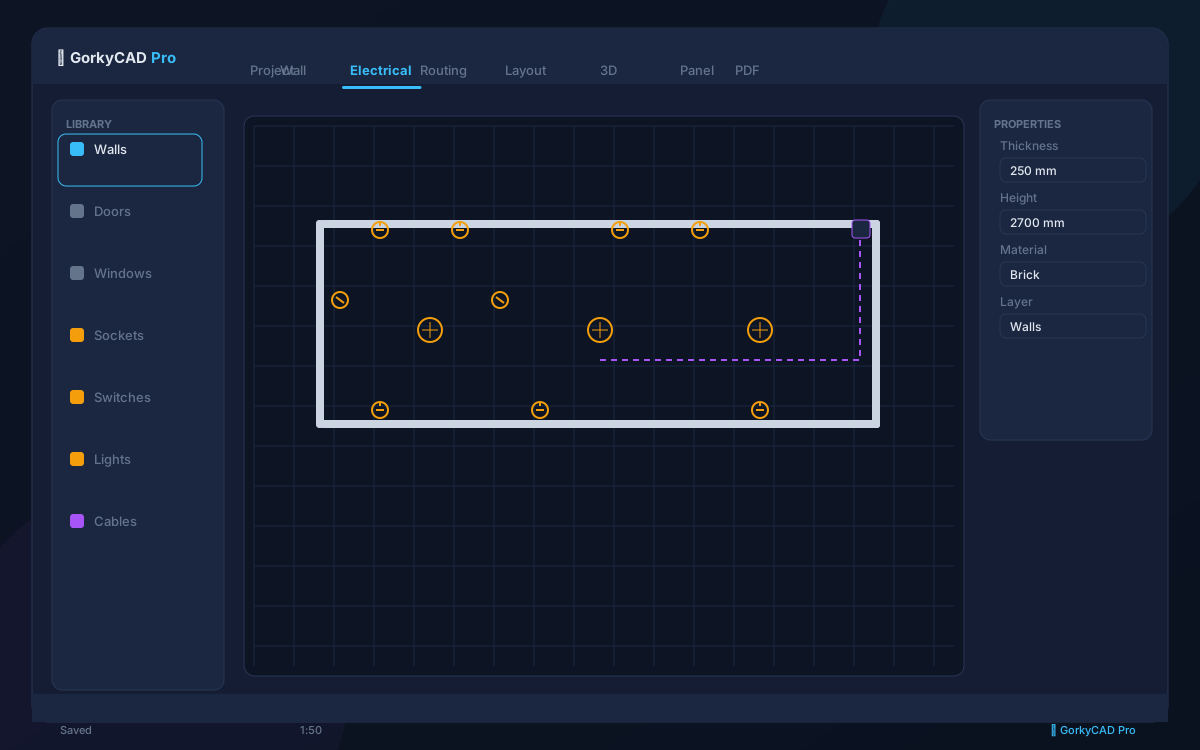
Available Objects
| Object | Hotkey | Properties |
|---|---|---|
| Power Outlet | O | Rated current, height, group, IP rating |
| Low-current Outlet | Shift+O | Type (RJ45/TV/phone), height |
| Switch | S | Single/double/pass-through, height |
| Light | L | Power, luminous flux, IP rating, height |
| Junction Box | J | Type, size |
| Panel | P | Type (main/sub/floor/apartment), busbar rating |
Placing Objects on Walls
Select an object, click on a wall. The object snaps automatically. Configure:
- Installation height (default: outlets 300 mm, switches 900 mm, lights on ceiling)
- Offset from wall corner (snap distance configurable)
Free Placement
Hold Ctrl while clicking to place an object freely (not on a wall) — useful for kitchen islands or open-plan areas.
Group Assignment
Each outlet/light belongs to a group connected to a specific breaker. Assign groups:
- Manually: select objects and set group number
- Automatically: GorkyCAD suggests optimal grouping based on load and room layout
Frequently asked questions
Is this article free?
Yes, all articles and calculators are completely free.
Yes, all articles and calculators are completely free.
Where can I run calculations?
The site offers 21 free calculators: cable sizing, breakers, RCD, voltage drop and more.
The site offers 21 free calculators: cable sizing, breakers, RCD, voltage drop and more.
How do I prepare an electrical project?
In GorkyCAD Pro: plans, panels, calculations and a PDF set for free.
In GorkyCAD Pro: plans, panels, calculations and a PDF set for free.
Found an error in the article?
Write to hello@gorkycad.pro — specialists will review and correct it.
Write to hello@gorkycad.pro — specialists will review and correct it.